The ESP32 has quietly become the chip you reach for when a project needs Wi-Fi, Bluetooth, and a microcontroller in one part. Hobbyists are now building game pads where the entire game runs on the pad itself, sensor meshes for the home, and wearables that talk to a phone. Picking the right ESP32 development app shapes the rest of the project. These seven desktop tools cover the full range, from one-click flashing to full IDF debugging.
What to look for in an ESP32 development app
A few questions sort the field:
- Are you flashing pre-built firmware or writing your own?
- Arduino C++, C with ESP-IDF, MicroPython, or Rust?
- Do you need a serial monitor with timestamps, plot view, or just a basic terminal?
- Does the tool include board manager and library manager, or are you running CLI tools by hand?
- Will you eventually want OTA updates, partition table editing, or NVS dumping?
Quick comparison
| App | Best for | Free plan | Paid | Platforms | Standout |
|---|---|---|---|---|---|
| Arduino IDE | First-time ESP32 users | Yes | Free | Windows, macOS, Linux | One-click board install and library manager |
| PlatformIO | Multi-board projects with version control | Yes | Free | Windows, macOS, Linux | Runs as a VS Code extension, full debug |
| ESP-IDF | Espressif’s official C SDK | Yes | Free | Windows, macOS, Linux | Direct access to every ESP32 feature |
| Thonny | MicroPython on ESP32 | Yes | Free | Windows, macOS, Linux | Built-in flasher, REPL, file browser |
| Mu Editor | Kids and beginners with MicroPython | Yes | Free | Windows, macOS, Linux | Simple modes, no setup friction |
| VS Code + Espressif | Full IDE workflow with ESP-IDF | Yes | Free | Windows, macOS, Linux | Hardware debug, IntelliSense for IDF |
| Wokwi | Simulating ESP32 in the browser | Free tier | $7/mo | Web, plus VS Code | Run firmware without a board |
The apps
1. Arduino IDE — best for first-time ESP32 users
The Arduino IDE is where most people start. Adding ESP32 board support is a single URL paste into the Boards Manager, after which dev boards like the ESP32-S3 appear in the dropdown. The library manager pulls in WiFi, Wire, and BLE stacks with one click.
Where it falls short: The editor is basic. No real IntelliSense, no debugger, and large projects feel cramped. Power users outgrow it within a few months.
Pricing: Free, open source.
Platforms: Windows, macOS, Linux.
Download: Arduino IDE
Bottom line: Start here if you’re new to ESP32, then graduate to PlatformIO when projects grow.
2. PlatformIO — best for serious projects
PlatformIO runs as a VS Code extension and turns it into a real embedded IDE. Library dependencies live in platformio.ini, projects target multiple boards from a single config, and the built-in debugger works with JTAG and ESP-PROG probes.
Where it falls short: First-run downloads are large. Building from scratch can take a couple of minutes on slower machines.
Pricing: Free, open source. PlatformIO Labs offers paid commercial support.
Platforms: Windows, macOS, Linux.
Download: PlatformIO
Bottom line: The standard tool for anyone past their first project. Pairs cleanly with Git.
3. ESP-IDF — best for direct access to ESP32 internals
ESP-IDF is Espressif’s official framework. C, with a FreeRTOS scheduler underneath, and direct access to every peripheral, power mode, and radio configuration the chip supports. Wi-Fi mesh, Bluetooth LE long range, ULP coprocessor code — all sit at the IDF layer.
Where it falls short: No GUI. Setup involves Python, CMake, and toolchain installers. Steep learning curve compared to Arduino.
Pricing: Free, open source.
Platforms: Windows, macOS, Linux.
Download: ESP-IDF
Bottom line: Use this when Arduino abstractions stop being enough.
4. Thonny — best for MicroPython on ESP32
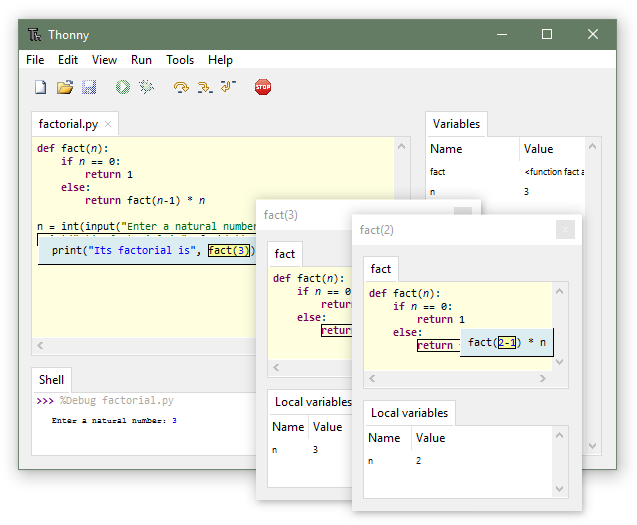
Thonny is the MicroPython editor most people land on. The “Install MicroPython” dialog flashes the firmware in two clicks, the file browser shows what’s actually on the board, and the REPL behaves predictably across resets.
Where it falls short: Built for Python. C and Arduino projects need another tool.
Pricing: Free, open source.
Platforms: Windows, macOS, Linux.
Download: Thonny
Bottom line: The fastest way to a Python-driven ESP32 project.
5. Mu Editor — best for beginners and classrooms
Mu Editor stays out of the way. It opens, you write Python, you press Flash, and the board runs your code. The CircuitPython mode handles the Adafruit ecosystem; the ESP32 mode covers MicroPython.
Where it falls short: Limited project structure. Power users will outgrow it almost immediately.
Pricing: Free, open source.
Platforms: Windows, macOS, Linux.
Download: Mu Editor
Bottom line: Recommend it to beginners and skip it for yourself.
6. VS Code + Espressif extension — best for full IDE workflow
VS Code with the official Espressif extension combines IntelliSense, debugger, JTAG support, and IDF project templates. The extension installs IDF, sets up environment variables, and exposes ESP-IDF commands through the VS Code command palette.
Where it falls short: Initial install is heavy. Some workflows still expect a terminal alongside the extension.
Pricing: Free, open source.
Platforms: Windows, macOS, Linux.
Download: Espressif IDF extension for VS Code
Bottom line: The right pick if you want ESP-IDF’s depth with a real IDE around it.
7. Wokwi — best for simulating projects without hardware
Wokwi is a browser-based simulator that runs ESP32 firmware as if on real hardware. Drag a board, wire up sensors, paste your code, and watch it run. It even simulates Wi-Fi calls so you can test cloud connections without a board.
Where it falls short: Not every peripheral simulates accurately. Some commercial features (private projects, no ads) require a subscription.
Pricing: Free tier; Pro is around $7/month.
Platforms: Web; also runs inside VS Code through the Wokwi extension.
Download: Wokwi simulator
Bottom line: Use it for tutorials, demos, and any time you don’t have the board handy.
How to pick the right one
- If you want the simplest option: Arduino IDE.
- If you’re building anything you’ll maintain past a weekend: PlatformIO.
- If you need every feature the chip offers: ESP-IDF.
- If you prefer Python: Thonny.
- If you’re teaching kids: Mu Editor.
- If you want the IDE depth of VS Code with IDF: VS Code + Espressif extension.
- If you don’t have a board on the desk right now: Wokwi.
FAQ
What is the easiest IDE for ESP32 beginners? Arduino IDE remains the easiest entry. Board support installs in a few clicks and libraries are well documented.
Is PlatformIO better than the Arduino IDE for ESP32? Yes once your project grows. PlatformIO gives version-controlled dependencies, multi-board builds, and a real debugger.
Can I program ESP32 in Python? Yes. MicroPython runs on most ESP32 boards. Thonny is the standard editor; Mu Editor works for simpler projects.
Do I need an Espressif debug probe? Not for most projects. The USB-CDC interface on newer boards (ESP32-S3, ESP32-C3) provides JTAG over USB. Older boards benefit from an ESP-PROG probe.
Which ESP32 development app supports OTA updates? All of them, eventually. Arduino has ArduinoOTA, PlatformIO has built-in OTA targets, and ESP-IDF has esp_https_ota. Pick the one that fits your build system.
Can I simulate ESP32 hardware? Yes. Wokwi runs firmware in a browser with simulated peripherals and Wi-Fi, which is enough for most development before you have boards in hand.