
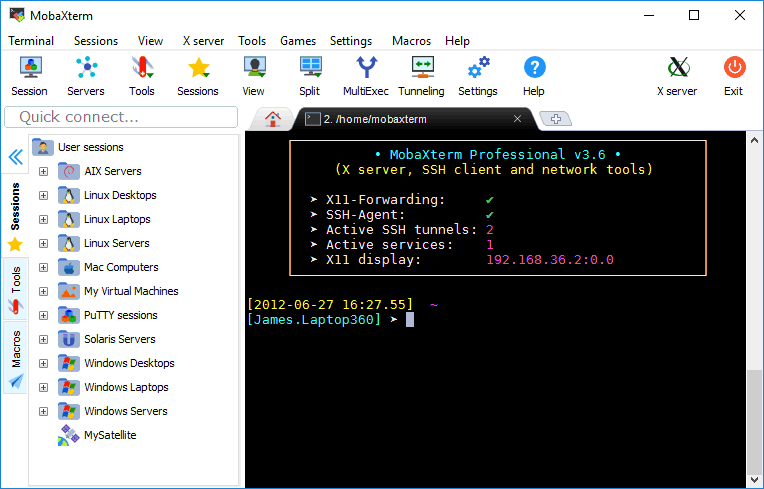
MobaXterm bundles SSH, SFTP, X11, a portable Cygwin-style shell, a session manager, and remote-desktop protocols into one Windows window. For sysadmins working across heterogeneous fleets, the value is obvious. The Home Edition free tier caps at 12 sessions and 2 SSH tunnels though, which crashes into the wall of any real environment, and the Professional license is sold per seat and starts adding up across a team. People searching for MobaXterm alternatives usually want one of three things: a more permissive free tier, a more modern interface, or a tool that runs the same way on macOS or Linux. We compared seven that do.
Quick comparison
| App | Best for | License | Platforms | Standout |
|---|---|---|---|---|
| Windows Terminal + WSL | Modern Windows default | Free | Windows | First-class OpenSSH and Linux shells |
| Tabby | Polished cross-platform tabs | Free, open-source | Windows, macOS, Linux | Plugin marketplace, themeable |
| Termius | Teams with shared servers | Freemium | Windows, macOS, Linux | Cloud-synced hosts and snippets |
| PuTTY | The classic minimalist | Free, open-source | Windows | Tiny, dependable, scriptable |
| KiTTY | PuTTY with quality of life | Free, open-source | Windows | Tabs, session passwords, autologin |
| mRemoteNG | Multi-protocol session manager | Free, open-source | Windows | RDP, VNC, SSH, telnet in one window |
| WindTerm | Native Windows SSH plus SFTP | Free | Windows, macOS, Linux | Built-in SFTP pane next to terminal |
Why people leave MobaXterm
The free tier caps hard. 12 saved sessions and 2 SSH tunnels covers a home lab but not a production environment. Once you hit the wall you either pay or split sessions across multiple machines.
The interface is dense. Tabs, the session sidebar, the macro pane, the file browser, and the X11 settings all share screen space, and finding a single setting can take a minute.
It is Windows only. The Mac and Linux machines in a mixed shop have to find a different tool, which means two sets of muscle memory.
Updates ship at a measured pace. Bug fixes land in the next quarterly release rather than the next week, and new protocols (newer SSH algorithms, newer Kerberos flows) lag the rest of the ecosystem.
The alternatives
Windows Terminal + WSL: modern Windows default
Microsoft’s own Windows Terminal pairs with WSL2 to give you a polished tabbed shell where each tab can be a different distribution, PowerShell, cmd, or Azure Cloud Shell. OpenSSH is built into recent Windows builds, so ssh user@host works from any tab without a third-party client.
Where it falls short: No GUI session manager, no SFTP pane, no X11 server out of the box. Power users wire up an SSH config and a scratchpad of host shortcuts.
Pricing: Free.
vs MobaXterm: Native, fast, modern. Trades the kitchen-sink toolset for a UNIX-style “compose small tools” approach.
Migrating from MobaXterm: Move your session list into ~/.ssh/config and your scripts into WSL.
Download: Microsoft Store or github.com/microsoft/terminal
Bottom line: The right pick for anyone comfortable in an SSH config file.
Tabby: polished cross-platform tabs
Tabby (formerly Terminus) is an Electron-based terminal with tabs, split panes, themes, an SSH connection manager, and a plugin marketplace. Connection profiles support SSH, serial, Telnet, and local shells, with a saved-credentials store backed by your OS keychain.
Where it falls short: Electron means a heavier RAM footprint than native terminals. Plugin quality varies.
Pricing: Free and open-source.
vs MobaXterm: Modern UI, cross-platform, polished session manager. No X11 server, no bundled Cygwin shell.
Migrating from MobaXterm: Re-enter saved sessions in Tabby’s connection manager.
Download: tabby.sh
Bottom line: The pick if you cared about the session manager and the tabs.
Termius: teams with shared servers
Termius syncs SSH hosts, snippets, port forwards, and credentials across devices through a cloud account. Team plans share the same host list across an organization, with role-based access. The clients are native-feeling on Windows, macOS, Linux, iOS, and Android.
Where it falls short: Free tier covers single-device use; cross-device sync and team features require a subscription. Cloud-hosted credentials require trusting their infrastructure.
Pricing: Freemium. Pro and Team tiers are subscriptions.
vs MobaXterm: Built around teams and multi-device sync. No X11.
Migrating from MobaXterm: Import hosts via SSH config or enter them in the connection manager.
Download: termius.com
Bottom line: The pick when more than one person needs the same host list.
PuTTY: the classic minimalist
PuTTY has been the default Windows SSH client for two decades. One window per session, SSH and Telnet and serial, a tree of saved sessions on the left. The companion utilities (PSCP, PSFTP, Pageant for keys, Plink for scripting) cover most of the rest.
Where it falls short: No tabs, no modern UI, no SFTP pane in the same window. Each saved session opens a fresh PuTTY window.
Pricing: Free and open-source.
vs MobaXterm: Far smaller scope, far smaller install. Many users keep PuTTY around for the moments when nothing else needs to be running.
Migrating from MobaXterm: Re-create sessions in PuTTY’s session manager.
Download: putty.org
Bottom line: The right pick when you want one tiny tool for one tiny job.
KiTTY: PuTTY with quality of life
KiTTY is a fork of PuTTY that adds the things PuTTY users have asked for: tabs, automatic password storage (encrypted), autologin scripts, transparency, a portable mode, and a host of small UI improvements. Settings remain compatible with PuTTY.
Where it falls short: Windows-only. Fork-of-PuTTY status means updates lag the upstream by a small margin.
Pricing: Free and open-source.
vs MobaXterm: Lighter than MobaXterm, more capable than PuTTY.
Migrating from MobaXterm: Save sessions one at a time in KiTTY’s profile manager.
Download: kitty.9bis.net
Bottom line: The pick if PuTTY almost worked and you wanted tabs.
mRemoteNG: multi-protocol session manager
mRemoteNG is a connection manager that handles RDP, VNC, SSH, Telnet, HTTP, and a few others in tabbed panels inside one window. It is essentially a meta-client: it wraps the OS’s RDP control, the OpenSSH client, and other tools and gives you a unified session tree and tab strip.
Where it falls short: Windows-only. UI shows its age. Wrapping other tools means occasional protocol-edge-case issues.
Pricing: Free and open-source.
vs MobaXterm: Similar session-manager idea, but the protocols are wrappers rather than first-party implementations.
Migrating from MobaXterm: Import RDP and SSH session lists via the supported config formats.
Download: mremoteng.org
Bottom line: The pick when you connect to a mix of Windows servers (RDP), Linux servers (SSH), and network gear (Telnet).
WindTerm: native Windows SSH plus SFTP
WindTerm is a native (non-Electron) cross-platform terminal that aims at the MobaXterm shape: tabbed sessions, a session tree, and a built-in SFTP pane that follows the active SSH tab. The native codebase makes it noticeably lighter than Electron-based options.
Where it falls short: Smaller community than the legacy options. UI density is closer to MobaXterm than to Tabby.
Pricing: Free.
vs MobaXterm: Same shape, no session caps, native performance.
Migrating from MobaXterm: Save sessions in WindTerm’s tree, copy across keys.
Download: github.com/kingToolbox/WindTerm
Bottom line: The closest free MobaXterm clone, minus the X11 and the Cygwin shell.
How to choose
Pick Windows Terminal + WSL if you are comfortable in an SSH config and prefer composing small native tools.
Pick Tabby if you want a polished modern terminal with a connection manager and you do not mind Electron.
Pick Termius if more than one person on your team needs the same host list and you are willing to pay for sync.
Pick KiTTY or PuTTY when something tiny and immediate beats something feature-rich.
Pick mRemoteNG if half your job is RDP into Windows servers and the other half is SSH into Linux ones.
Pick WindTerm if you specifically liked the MobaXterm shape (sessions tree, SFTP pane) and want it free with no session cap.
Stay on MobaXterm if you genuinely use the X11 server, the bundled Cygwin tools, and the macro recorder together, and the Professional license is in your budget.
FAQ
Does WSL replace MobaXterm completely? For most modern workflows, yes. Recent Windows ships OpenSSH client and server, WSL2 gives you a real Linux userland, and Windows Terminal tabs the result. The pieces MobaXterm bundled (X11, Cygwin) have Windows-native equivalents (X410, WSLg, or a community X server) when you need them.
Which alternative is the closest free MobaXterm replacement? WindTerm is the closest in shape (sessions tree, SFTP pane, tabbed terminal) with no session cap. Tabby is the closest in polish.
Can these alternatives forward X11? Tabby, KiTTY, and PuTTY support X11 forwarding through the SSH protocol when paired with an X server. WSLg in modern Windows provides an X server automatically. None of them bundle a full X server the way MobaXterm does.
Is Termius free for personal use? The free tier covers single-device use with basic features. Sync across devices, teams, and snippet library require a paid plan.
Which option works on a Mac as well? Tabby, Termius, and WindTerm have first-class macOS builds. PuTTY, KiTTY, and mRemoteNG are Windows-only. Windows Terminal is Windows-only.
