
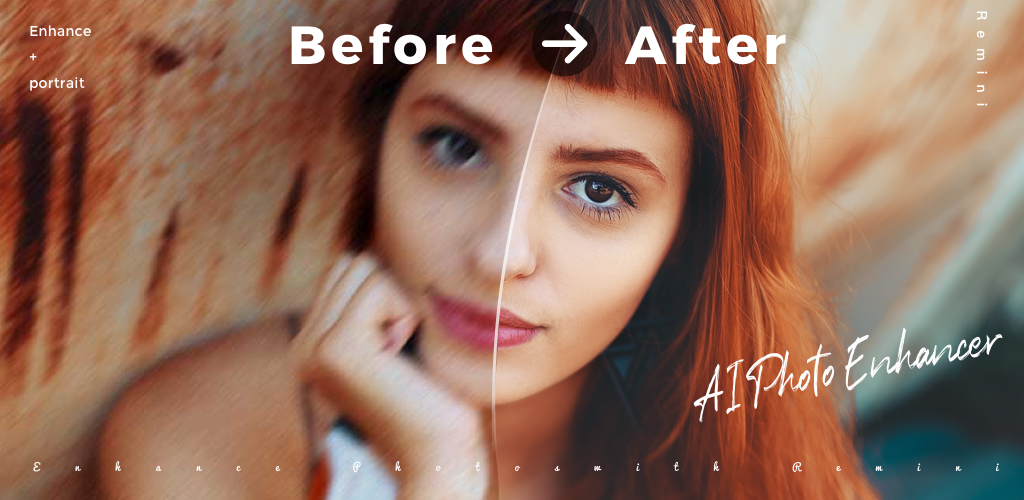
Remini is the name people search when an old photo needs help. Face restoration on group shots, single-tap unblur on phone-camera misses, and the trademark before-and-after share card all earn it the top of the AI enhancer category. The downsides arrive at checkout. Free runs are quota-limited, the weekly Pro tier sits at the upper end of the market, and every photo travels to a Bending Spoons server before it returns. For users restoring a backlog of family albums, the cost climbs fast and the queue gets long.
The good news is that the Remini alternatives field has filled out. Several apps now match the face restoration quality, a few undercut the price, and a handful keep the edit on-device for users wary of cloud uploads. We tested seven across portrait restoration, super-resolution, and broader photo cleanup.
Quick comparison
| App | Best for | Free plan | Starting price | Platforms |
|---|---|---|---|---|
| UpFoto | Direct Remini swap at lower price | Yes, with daily quota | About $4.99/mo Premium | Android, iOS |
| PhotoDirector | Restoration inside a real editor | Yes, with watermark | $5.99/mo | Android, iOS |
| Adobe Lightroom Mobile | Tonal recovery and AI Denoise on RAW | Yes, light | $9.99/mo Photography | Android, iOS |
| Picsart | AI Enhance plus a wider toolkit | Yes, ad-supported | Plus around $11.99/mo | Android, iOS, web |
| Polish | One-tap unblur on recent photos | Yes, with watermark | $4.99/mo | Android, iOS |
| Snapseed | Free manual restoration on-device | Yes, fully free | Free | Android, iOS |
| Lensa AI | AI portraits and avatar packs | Yes, ad-supported | About $7.99/mo Pro | Android, iOS |
Why people leave Remini
Weekly Pro pricing. The headline price is a weekly number, which adds up to one of the steepest yearly costs in this category. Users restoring a one-time photo batch dislike paying recurring rent for a finite job.
Daily free quotas. Free runs cap quickly and the timer for the next free enhancement is long. Anyone working through a shoebox of prints hits the wall on day one.
Cloud-only processing. Every photo uploads to Bending Spoons servers before processing. Users uneasy about sending family portraits to a third party look for on-device options.
Queue waits at peak. Reddit threads mention slower returns during evenings and weekends. The wait is short on a single photo but visible on a batch of twenty.
Aggressive in-flow upsell. The Pro modal appears between the upload and the result. Users mention friction even after dismissing it once.
The best Remini alternatives
UpFoto, the closest direct Remini swap
UpFoto runs the same playbook as Remini, with face restoration, super-resolution, colourisation, and old-photo repair, at a Premium price closer to the middle of the market. Output quality on portraits sits a notch below Remini on hard cases but holds up well on family snapshots and recent low-light photos.
UpFoto vs Remini comes down to price and ad pacing. UpFoto is cheaper and more lenient on free runs; Remini still wins on the toughest faces.
Where it falls short: Ads stack between enhancements on free. HD output sits behind the subscription. Cloud-only processing carries the same data trade-off as Remini.
Pricing:
- Free: A handful of daily restorations with watermark options
- Premium: Around $4.99 a month for unlimited HD enhancements
- vs Remini: Cheaper monthly with comparable single-shot output
Migrating from Remini: Reimport the same photos. The interface mirrors Remini closely enough that there is no learning curve.
Bottom line: Pick UpFoto if Remini’s weekly price is the sticking point and the photos are mostly recent or moderately damaged.
PhotoDirector, restoration inside a real editor
PhotoDirector bundles AI photo enhance, AI sharp, AI denoise, and old-photo restoration into a full mobile editor. The restoration step happens on the same canvas where you can crop, colour-grade, and remove objects, which removes a round-trip step that Remini forces on anyone who needs more than enhancement.
For users who restore photos that need a colour pass or a final crop, PhotoDirector vs Remini is a one-stop pipeline rather than a single-purpose tool.
Where it falls short: Watermarks on free exports. The interface is denser than Remini and takes a session to learn.
Pricing:
- Free: Editing with watermark and limited cloud assets
- Premium: $5.99 a month or about $34 a year
- vs Remini: Comparable monthly with deeper editing tools
Migrating from Remini: Run AI enhance on the same source photos, then finish the colour and crop pass without leaving the app.
Bottom line: Pick PhotoDirector if restoration is one step in a longer edit, not the whole job.
Adobe Lightroom Mobile, tonal recovery for film scans
Adobe Lightroom Mobile does not pitch itself as an AI photo enhancer, but the AI Denoise tool, exposure recovery, and the recent generative remove feature handle a lot of what Remini users need on scanned negatives and underexposed phone shots. Recovery on RAW or DNG scans of family slides is genuinely better than what a one-tap enhancer produces.
For photographers digitising negatives or working through a film archive, Adobe Lightroom vs Remini is a different category but a stronger result.
Where it falls short: Subscription gates the desktop sync, generative tools, and most cloud features. AI Denoise needs a few seconds per photo on older devices.
Pricing:
- Free: Mobile editing with non-destructive presets and basic adjustments
- Photography Plan: $9.99 a month with Lightroom on desktop and 20GB cloud storage
- vs Remini: More expensive monthly but a different toolset entirely
Migrating from Remini: Reimport scans as DNG or full-resolution JPG, run AI Denoise and tonal recovery, export at full resolution.
Bottom line: Pick Lightroom for serious archival work where exposure and colour matter more than face restoration.
Picsart, AI Enhance plus a wider toolkit
Picsart ships an AI Enhance tool that covers the same one-tap restoration job as Remini, alongside a full design and editing app with templates, background remover, and AI image generation. The single-tap result is a step behind Remini on tough faces but solid on everyday photos.
For users who edit, design, and restore in the same workflow, Picsart vs Remini trades a touch of restoration quality for a much broader feature set.
Where it falls short: AI features burn metered credits on the Plus plan. The interface can feel busy for a single-photo restoration job.
Pricing:
- Free: AI Enhance with credit caps and watermark on some exports
- Plus: Around $11.99 a month for ad-free editing and higher credit allowances
- vs Remini: More expensive monthly with a far wider toolkit
Migrating from Remini: Use AI Enhance for the restoration pass, then jump straight to background remove or text overlays in the same app.
Bottom line: Pick Picsart if the photo restoration is one step before a social post or a design layout.
Polish, one-tap unblur on recent photos
Polish focuses on the everyday job rather than the archival one. The unblur tool handles motion blur on phone shots well, the AI cleanup removes dust and minor scratches, and the beauty editor handles selfies in the same app. Output quality on faces sits below Remini, but the speed and the price are both better.
For users restoring last weekend’s photos rather than 1990s prints, Polish vs Remini is faster, cheaper, and produces fewer artefacts on already-decent source photos.
Where it falls short: Watermarks on free exports. Restoration of severely damaged photos lags Remini and PhotoDirector.
Pricing:
- Free: Editing with watermark and ad pacing
- Pro: $4.99 a month or around $29.99 a year
- vs Remini: Cheaper monthly with weaker output on the worst cases
Migrating from Remini: Reimport recent photos and run AI Enhance or Unblur. Pro removes the watermark.
Bottom line: Pick Polish for fast cleanup on phone photos, not for restoring damaged archival prints.
Snapseed, free manual restoration on-device
Snapseed is the only pick that runs entirely on-device, costs nothing, and ships from Google with no subscription pressure. Restoration is manual rather than AI-driven: healing brush, selective adjustments, sharpen, and structure. The result on a damaged print depends on how patient you are with the masks, but the ceiling is genuinely high.
For users uneasy about cloud uploads or unwilling to pay any subscription, Snapseed vs Remini trades one-tap convenience for full control and zero cost.
Where it falls short: No AI restoration shortcut. The learning curve is real, and recent updates have not added the kind of generative tools that Remini ships.
Pricing:
- Free: Everything, no ads, no subscription, no watermark
- vs Remini: Free, but slower and more manual
Migrating from Remini: Reimport photos and use the healing brush for scratches, selective masks for tonal recovery, and the sharpen tool for unblur.
Bottom line: Pick Snapseed if the priority is on-device privacy and zero cost, and you do not mind the time investment.
Lensa AI, AI portraits and avatar packs
Lensa AI comes from the same publisher as Remini and shares the cloud-AI backbone. The fit is for users who came to Remini for the AI portrait packs and stylised avatars rather than the restoration job. Lensa generates studio-style portraits, themed avatar sets, and edit-style AI photos that Remini does not focus on.
For users whose interest is closer to a new profile picture than a restored old one, Lensa AI vs Remini is the better-aimed tool.
Where it falls short: Avatar packs need a batch of selfies and a wait time of fifteen to thirty minutes. The Pro plan is required for most outputs.
Pricing:
- Free: Limited tools and previews
- Pro: Around $7.99 a month or about $39.99 a year
- vs Remini: Comparable yearly cost with a different output category
Migrating from Remini: Upload a fresh batch of selfies for an avatar pack, or use the photo enhancement tool for a Remini-style restoration on portraits.
Bottom line: Pick Lensa for AI portraits and avatar packs, not for traditional photo restoration.
How to choose
Pick UpFoto if the weekly Pro price is the only thing keeping you on Remini, and your photos are mostly recent or moderately damaged. The output is close enough to Remini that the saving feels real.
Pick PhotoDirector if you keep editing photos after the AI enhance step. Doing the restoration inside the same canvas where you crop and colour-grade saves a real round-trip.
Pick Adobe Lightroom Mobile if you are digitising film scans or working with RAW. The exposure and colour recovery is in a different league for that specific job.
Pick Snapseed if cloud uploads are the deal-breaker, or if you simply will not pay a subscription. The output ceiling is high, and the time cost is the only price.
Stay on Remini if face restoration on the worst-case photos is non-negotiable. Twenty-year-old portraits, blurry group shots, and severely degraded prints still come back cleaner from Remini than from any of the alternatives we tested.
FAQ
Is there a free Remini alternative? Snapseed is fully free with no ads, no subscription, and no watermark, but the restoration is manual rather than one-tap. UpFoto and Polish offer free runs each day with quotas and watermark options on free exports.
What is the cheapest Remini alternative? Snapseed at zero cost, then UpFoto and Polish at around $4.99 a month for unlimited use without watermarks. Both undercut Remini’s weekly Pro tier by a significant margin on a yearly basis.
Which Remini alternative gives the best face restoration? Remini still leads on the worst-case faces in our tests, but UpFoto and PhotoDirector come close on portraits that are not severely damaged. For everyday phone photos, the difference is small.
Can I restore old photos without uploading them to the cloud? Snapseed runs entirely on-device. Lightroom processes most adjustments locally, with AI Denoise running on-device on most modern phones. Remini, UpFoto, and PhotoDirector all process server-side.
Does any Remini alternative work without a subscription? Snapseed is fully free. UpFoto, Polish, PhotoDirector, and Picsart all offer free tiers with quotas, watermarks, or both. Lightroom’s free mobile tier covers most adjustments without an Adobe ID required for sign-in.
Is Remini better than UpFoto? On the hardest restoration cases, yes. On everyday photos and portraits in reasonable condition, the gap closes to where the price difference matters more than the quality gap.
{/* FAQPage schema: generate JSON-LD from the Q&A pairs above before publishing */}


