

Why people leave Reverse Song & Voice Challenge
- The novelty wears off in about a week. The core trick, record then play backwards, has one punchline, and the app leans on it for everything.
- Ads land on almost every action. Recording, playback, saving, and sharing each trigger a full-screen interstitial or a mid-clip banner.
- The effect list is thin. Beyond reverse, speed, and pitch, there is very little to play with, and the pitch curve is coarse enough to sound harsh on longer clips.
- Sharing quality drops. Exported clips arrive at lower bitrates on most social apps, and there is no way to export a clean WAV or high-bitrate MP3 without paying.
If any of that stings, here are seven Reverse Song & Voice Challenge alternatives worth installing instead.
Quick comparison
| App | Best for | Ads | Effect library | Standout feature |
|---|---|---|---|---|
| Voice Changer with Effects (Baviux) | Deep effect library | Light, no interstitials | 40+ presets | Save any effect as ringtone or alarm |
| Voice Changer (302 Lock Screen) | Fast prank clips | Moderate | 30+ effects | Layer effects on top of a music bed |
| Voice Changer - Voice Effects | Social-first exports | Moderate | Roughly 25 effects | One-tap share to WhatsApp and TikTok |
| Super Voice Changer - Editor | Trimming and cleanup | Moderate | Around 20 effects | Timeline editor with fade in and out |
| Reverse Voice for Fun | Pure reverse challenges | Light | Reverse plus speed | Turntable-style playback loop |
| Reverse Audio (Pixelab) | Reversing existing tracks | Light | Reverse only | Load and reverse any MP3 or WAV on your phone |
| Girl Voice Changer PRANK | Voice-swap pranks | Heavier | Character voices | Prebuilt prank scripts you play back |
1. Voice Changer with Effects — best deep effect library

Voice Changer with Effects by Baviux is the app most people mean when they say "voice changer" on Android. It ships with more than 40 presets, from helium and robot to zombie, drunk, and cave, and it plays every effect live so you can preview before recording.
Where it beats Reverse Song & Voice Challenge is depth. The pitch and formant sliders are exposed, so you can dial a voice past the presets. Saving output as an MP3, WAV, or Android ringtone works without a paywall.
The reverse effect is here too, along with speed and echo, so it covers the full Reverse Song feature set and adds another 30 tools on top.
Where it falls short: The UI is dated. The banner ads are quiet but always visible on the free tier.
Pricing: Free with banner ads. A one-time in-app purchase removes ads and unlocks a few premium effects.
Bottom line: If you want a single app that replaces Reverse Song and grows with you, start here.
2. Voice Changer (302 Lock Screen) — best for quick prank clips

Voice Changer from 302 Lock Screen has crossed 10 million installs on Google Play and does one thing well: turn a short recording into a chipmunk, robot, duck, or drunk voice in about two taps.
The layout is closer to Reverse Song & Voice Challenge than any other pick here. Big red record button, big share button, and a grid of effect thumbnails. What it adds is a music-bed layer, so you can drop your modified voice over a beat and export both together.
Where it falls short: No fine control. Effects are all-or-nothing presets, and you cannot chain them without exporting and re-importing.
Pricing: Free with occasional interstitial ads. A subscription removes ads and unlocks a few premium presets.
Bottom line: Pick this if you want the same simplicity as Reverse Song, but with more effects and a music layer.
3. Voice Changer - Voice Effects — best for social-first exports
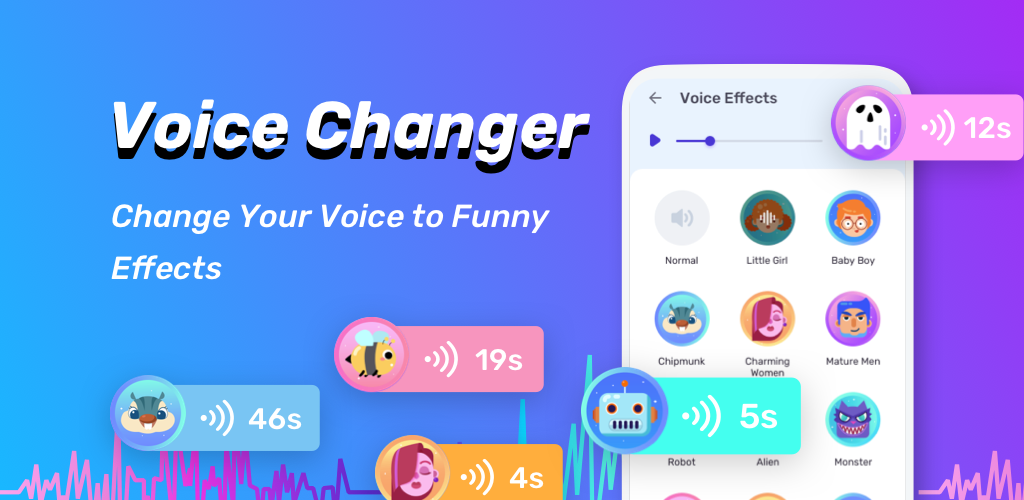
This one leans into how people actually use these apps: record something silly, share it fast, move on. The share sheet is prewired for WhatsApp, TikTok, Instagram, and Telegram with the right file format for each. No re-encoding surprise, no clipped audio on WhatsApp voice notes.
The effect count sits around 25, and there is a small library of ambient beds (rain, cafe, gaming lobby) you can drop under a clip for a bit of context. The reverse effect and speed slider are both present, so you can still play the classic backwards challenge.
Where it falls short: The recording quality maxes out at a middling bitrate on the free tier. Long clips over about 60 seconds are cut on export.
Pricing: Free with ads. An in-app upgrade removes ads and lifts the 60-second export cap.
Bottom line: Choose this if the whole point is posting to WhatsApp and TikTok, not building a library.
4. Super Voice Changer - Editor — best if you want to trim and clean up

Super Voice Changer by Handy Tools Studio adds a proper waveform editor to the voice-effects idea. You record, drop an effect, then trim, split, or crossfade the clip before exporting. That single addition changes what the app is for.
The effect count is smaller, around 20, and none of them are exotic. What you get instead is a timeline where you can layer two voices, add a fade in, and cut out the dead air at the start. For clips that need to feel finished rather than raw, this matters.
Where it falls short: The learning curve is a bit steeper than the one-tap apps. Some editing tools are behind a paywall.
Pricing: Free tier with ads and a limited feature set. Paid upgrade unlocks the full editor and removes ads.
Bottom line: Use this when you want the joke to land clean, not sound like a raw phone recording.
5. Reverse Voice for Fun — closest match to the core Reverse Song trick

Reverse Voice for Fun by Fire Shooters is the app that stays closest to what Reverse Song & Voice Challenge actually does. Record, play backwards, try to mimic the reversed clip, then reverse the mimic to see how close you got. The turntable-style interface makes the loop feel physical.
What tips it over Reverse Song is the ad load. Recording and playback do not trigger interstitials, and the app keeps a history of every clip so you can revisit last week's attempts.
Where it falls short: There is nothing beyond reverse and speed. If you want robot voice or auto-tune, this is not the pick.
Pricing: Free with banner ads. No subscription pressure.
Bottom line: The pure-play reverse challenge app, less cluttered than the original.
6. Reverse Audio (Pixelab) — best for reversing tracks you already own

Reverse Audio by Pixelab is not a voice-changer. It is a small tool that takes any audio file on your phone, MP3, WAV, M4A, and plays it backwards. That is the whole app, and for a specific job it is the right shape.
The use case: you want to hear the reversed hook of a song you have on your device, or you want to run a song through reverse for a video edit. Reverse Song & Voice Challenge cannot do that, because it only reverses new recordings.
Where it falls short: No mic recording. It only reverses files you feed it, so if you want to record a voice and reverse it in the same app, this is not it.
Pricing: Free with light ads. No subscription.
Bottom line: Pair it with any of the recorder apps above when you want to reverse an actual song rather than a fresh voice memo.
7. Girl Voice Changer PRANK — best for scripted voice pranks

The name is on the nose, and so is the app. Girl Voice Changer PRANK from Sink Apps focuses on cross-gender voice modulation, with a set of prewritten prank scripts you can play back into a call or a shared recording.
It is a narrower tool than the general voice changers above, but the specific job it does, sound convincingly like a different gender for a short bit, is one Reverse Song does not attempt. The formant shift is more careful than the standard pitch slider you get elsewhere.
Where it falls short: The ad load is heavier than most picks here. Some sample scripts feel dated.
Pricing: Free with frequent interstitial ads. An upgrade removes them.
Bottom line: Pick it only if the specific prank format is what you want. For general voice fun, one of the first four picks is a better home.
Which app should you choose?
- Voice Changer with Effects if you want one app to replace Reverse Song and keep growing with you. Deepest effect library, cleanest export options.
- Voice Changer (302 Lock Screen) if you want the same one-tap simplicity as Reverse Song, with more effects and a music-bed layer.
- Voice Changer - Voice Effects if you record clips to send straight to WhatsApp or post to TikTok and stop caring about them.
- Super Voice Changer - Editor if the joke needs polish. Trim, fade, layer, export.
- Reverse Voice for Fun if what you actually want is the reverse challenge minus the ad wall.
- Reverse Audio if you want to reverse an existing song or track, not just a fresh recording.
- Girl Voice Changer PRANK only if the specific cross-gender prank format is the point.
Stay on Reverse Song & Voice Challenge if you only open a voice app twice a month and the ads do not bother you. Nothing on this list is dramatically better at the pure "record, reverse, laugh" loop the original nails on install.
FAQ
What is the best free Reverse Song & Voice Challenge alternative?
Voice Changer with Effects by Baviux. It has the biggest effect library on the free tier and lets you export MP3, WAV, or ringtone without a subscription.
Can I reverse an existing song on my phone, not just a recording?
Yes, Reverse Audio by Pixelab takes any MP3, WAV, or M4A file on your device and plays it backwards. Reverse Song only reverses new recordings you make in the app.
Which voice changer works best for prank calls?
Girl Voice Changer PRANK if you want the specific cross-gender effect. Voice Changer (302 Lock Screen) if you want a broader set of prank voices, from chipmunk to zombie, that you play back over a call or into a shared clip.
Are these apps safe to install?
Every pick here is available on Aptoide and Google Play. Aptoide runs a malware scan on each APK before publishing, and every app listed above shows as "trusted" on Aptoide at time of writing.
Do any of these work offline?
Yes. All seven work fully offline for recording, effect processing, and local export. Sharing to WhatsApp, TikTok, or Instagram still needs an internet connection.
What replaces the "sing challenge" mode in Reverse Song?
Reverse Voice for Fun keeps the same challenge loop, record forwards, hear backwards, try to mimic the backwards version, then reverse the mimic. The turntable interface makes the loop easier to follow than Reverse Song's version.

