
Leaving the Google ecosystem sounds harder than it is once the target is a NAS, a mini-PC, or a cheap VPS. A single docker compose up -d can hand back the parts of Google most people use every day: files, photos, calendar, documents, search, video, passwords, even a public blog. The apps in this guide are the ones actually worth running once the containers are wired up, not the shortest listicle a search engine could return.
This is a shortlist of eight self-hostable services, picked after cross-checking r/selfhosted threads, the awesome-selfhosted list, and the current release notes of each project. Every app here runs from an official container image, ships on the amd64 and arm64 Docker platforms that cover Synology, TrueNAS, Unraid, Proxmox LXC, and any Linux, Windows, or macOS box running Docker Desktop. These are the best apps for self-hosted Google service replacements when the reader intends to deploy on server hardware rather than a phone.
What to look for in a self-hosted Google replacement
Not every open-source project deserves a place in the compose file. The shortlist that follows was filtered on five practical criteria, each learned the hard way by homelabbers on Reddit and the r/selfhosted wiki.
- Official Docker image, ideally multi-arch. Community forks stall, upstream images do not.
- A stated backup and restore path. If the docs cannot answer “how do I move this to a new host”, the data is not really under control.
- External access without opening ports. Cloudflare Tunnel, Tailscale Serve, or a reverse proxy on the same host must be documented.
- Sensible defaults for encryption at rest and in transit. HTTPS via Traefik or Caddy, server-side encryption for object stores, hashed secrets in env files.
- A release cadence in the last 90 days and an issue tracker that is answered, not archived.
Quick comparison
| App | Google service replaced | License | Deploy path | Complexity | Hosted tier |
|---|---|---|---|---|---|
| Nextcloud | Drive, Docs, Contacts, Keep | AGPL-3.0 | Nextcloud AIO or nextcloud/apache image | Low with AIO, medium standalone | Yes, from partners |
| Immich | Photos | AGPL-3.0 | Docker Compose (server, ML, Postgres, Redis) | Medium | No |
| Vaultwarden | Passwords, Password Manager | AGPL-3.0 | Single container | Very low | No |
| Radicale | Calendar, Contacts | GPL-3.0 | Single Python container | Very low | No |
| OnlyOffice Docs | Docs, Sheets, Slides | AGPL-3.0 | onlyoffice/documentserver | Medium | Yes, from OnlyOffice |
| SearXNG | Search | AGPL-3.0 | searxng/searxng image | Low | No, but public instances exist |
| Piped | YouTube | AGPL-3.0 | Frontend, backend, and Postgres containers | Medium | No, community instances only |
| Ghost | Blogger | MIT | ghost:latest image plus MySQL 8 | Low | Yes, Ghost Pro |
The apps
1. Nextcloud, best for replacing Google Drive and Docs in one deployment
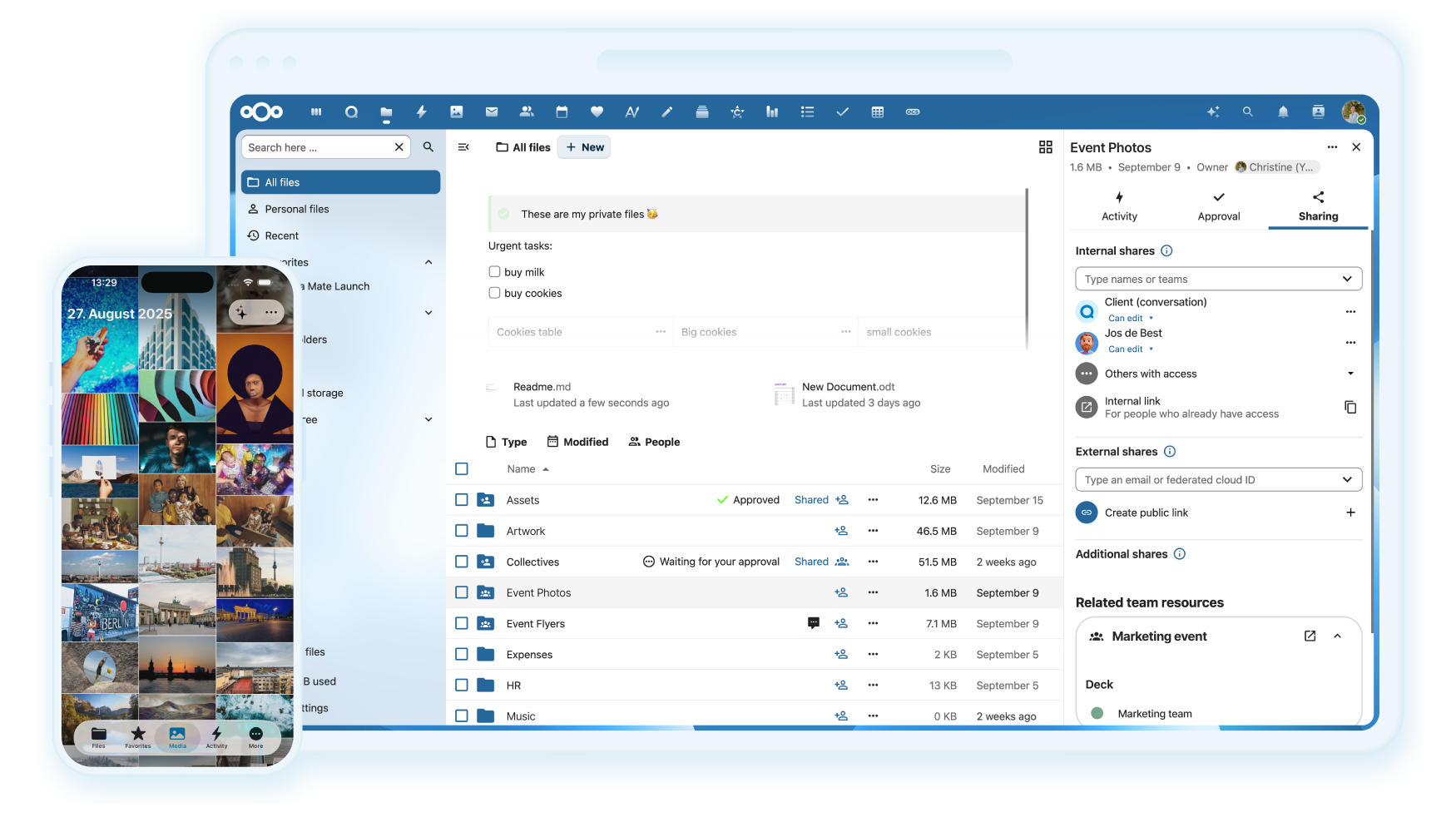
Nextcloud is the anchor of most self-hosted stacks and the reason “Google Drive alternative” and “Google Docs alternative” often point at the same box. Files sync across desktop and mobile clients, contacts and calendars ride on CalDAV and CardDAV, and the Office app pulls in Collabora or OnlyOffice for real-time document editing. The Nextcloud All-in-One image handles Postgres, Redis, Collabora, Talk, and backups in a single mastercontainer, which turns what used to be a weekend project into a 20-minute setup.
Where it falls short: the app store is huge and quality varies a lot, so a fresh install with 15 community apps installed will feel slower than a stock deployment. Server tuning matters at scale (opcache, APCu, database indexing), and users coming from Google will notice slower thumbnail generation for very large photo libraries.
Pricing:
- Free: fully featured, unlimited users, unlimited storage bounded only by the disk.
- Paid: Nextcloud Enterprise subscriptions start around 37.49 euro per user per year for organisations that want SLAs and hardened update channels. Home users never need this.
Platforms: Linux, Windows, and macOS via Docker. Native desktop sync clients for Windows, macOS, and Linux. Mobile clients for iOS and Android.
Bottom line: Nextcloud for the self-hosted Google Drive and Docs replacement is the safe default, and the All-in-One path makes it the right pick for anyone deploying for the first time.
2. Immich, best for replacing Google Photos with your own machine learning
Immich has become the reason a lot of homelabbers finally cancel Google One. Timeline scrolling, face grouping, object search, shared albums, external library scans, and a mobile app that backs up in the background all work out of the box. The machine-learning container runs CLIP and face detection on the same host, so nothing about the photo library ever leaves the LAN unless external access is opened deliberately.
Where it falls short: Immich still labels itself pre-1.0 and warns against relying on it as the only copy of a library, so a second backup target (Backblaze B2, Storj, a second NAS) is mandatory. GPU acceleration for the ML container is optional but recommended once the library passes about 50,000 assets.
Pricing:
- Free: the whole product. No paywalled features.
- Paid: none. Donations via GitHub Sponsors and OpenCollective fund development.
Platforms: Linux, Windows, and macOS via Docker Compose. Mobile clients for iOS and Android.
Bottom line: pick Immich if the Google Photos features that matter are face grouping, natural-language search, and reliable phone backup; skip it if the only requirement is a shared folder of images, where Nextcloud Photos is enough.
3. Vaultwarden, best for replacing Google Password Manager on tiny hardware
Vaultwarden is a Rust reimplementation of the Bitwarden server that talks to the official Bitwarden clients. Memory usage sits around 30 MB, the container is a single binary, and every paid Bitwarden feature (organisations, Yubikey, Duo, emergency access) works without a licence. Vaults are encrypted end-to-end with the account master password before they ever hit the server, so the operator never holds a decryptable copy.
Where it falls short: Vaultwarden is not maintained by Bitwarden Inc. and lags official server releases by a short window when the API changes. Password sharing at team scale still relies on the Bitwarden clients, which are polished but heavier than something like KeePassXC.
Pricing:
- Free: everything, including the features that cost money on Bitwarden’s own cloud.
- Paid: none.
Platforms: Linux, Windows, and macOS via Docker. Bitwarden desktop, browser, and mobile clients on every platform Bitwarden supports.
Download: GitHub
Bottom line: Vaultwarden is the app in this list with the lowest cost of adoption; a Raspberry Pi with 512 MB of RAM can run it for a whole household.
4. Radicale, best for replacing Google Calendar and Contacts without a full groupware install
Radicale is 3,000 lines of Python that speak CalDAV and CardDAV, and that is the entire feature set. It refuses to grow, which is exactly the point. Deploying it means writing a users file, mounting a data volume, and pointing Thunderbird, Apple Calendar, DAVx5, or the Nextcloud Calendar client at the URL. Data lives as plain .ics and .vcf files on disk, so migration between hosts is a tar command.
Where it falls short: no web UI worth using in production, and no built-in scheduling or free-busy features. Radicale expects the clients to do the work of rendering and inviting.
Pricing:
- Free: the entire project.
- Paid: none.
Platforms: Linux, Windows, and macOS via Docker or plain pip install. Any CalDAV or CardDAV client on any platform.
Bottom line: pick Radicale when the Nextcloud groupware stack is overkill and the goal is just a private calendar and address book that syncs cleanly across three devices. For anyone who also wants tasks, journals, and web access, Baikal is the close cousin worth evaluating.
5. OnlyOffice Docs, best for replacing Google Docs with a real editor
OnlyOffice Docs runs the same document server that pairs with Nextcloud, Seafile, and its own OnlyOffice Workspace suite. It renders .docx, .xlsx, and .pptx with high fidelity because it uses the same file formats natively, so a document authored in Microsoft Word round-trips without the layout drift that catches Collabora users. Real-time co-editing over WebSockets works for teams up to about 20 people on a modest 4-core VPS.
Where it falls short: the Community Edition caps concurrent connections at 20, which is enough for a household or a small team, but a paying seat is needed above that. The document server needs its own container, its own reverse proxy rule, and JWT secrets shared with whichever storage frontend uses it.
Pricing:
- Free: OnlyOffice Docs Community Edition, 20 concurrent connections, all editors.
- Paid: OnlyOffice Docs Enterprise starts around 1,200 US dollars per year for 50 connections, which is the price of a stable release channel and support rather than the editor itself.
Platforms: Linux, Windows, and macOS via Docker. Also ships as a desktop editor for Windows, macOS, and Linux.
Download: OnlyOffice or GitHub
Bottom line: pair OnlyOffice Docs with Nextcloud for the closest one-to-one Google Docs replacement on the market; homelabbers who mostly touch Markdown or plain text should skip it and save the RAM.
6. SearXNG, best for replacing Google Search without giving up the results
SearXNG is a metasearch engine that queries Google, Bing, DuckDuckGo, Brave, Wikipedia, and about 200 other backends in parallel, strips the trackers, and returns a merged result page. Running it locally means every query hits the upstream engines from the server’s IP, not the browser’s, and no cookies or search history are stored unless the operator turns that on.
Where it falls short: personalisation is by design absent, so results feel colder than a signed-in Google session for local queries like restaurants or navigation. Some backends rate-limit self-hosted instances, which is a good reason to keep the container behind a login page rather than exposing it to the internet.
Pricing:
- Free: everything.
- Paid: none.
Platforms: Linux, Windows, and macOS via Docker. Set it as the default search engine in any browser.
Bottom line: the fastest of these to deploy, and the one that Google itself notices least because no account is ever created.
7. Piped, best for replacing YouTube on a household network
Piped is a YouTube frontend that strips ads, sponsor segments, and Google tracking while keeping recommendations, subscriptions, and playlists. The stack has three containers (frontend, backend, and Postgres) plus a proxy service that fetches video streams on behalf of viewers. Setting the browser and Newpipe-style mobile clients to point at the local instance turns family YouTube into a service that never signs in.
Where it falls short: YouTube’s API changes regularly break Piped and its siblings. Expect occasional weekends where the backend has to be updated and the proxy rotated to keep videos playing. Live streams are still spotty.
Pricing:
- Free: everything.
- Paid: none.
Platforms: Linux, Windows, and macOS via Docker. Browser-side, no client install needed.
Bottom line: Piped is the power-user pick, worth running when household YouTube time is high enough that the ad tax is annoying, and when someone on the network is willing to babysit the occasional break. Invidious is the older, calmer alternative if stability is the priority.
8. Ghost, best for replacing Blogger with a publishing platform
Ghost ships a Node.js content management system that puts blog posts, newsletters, membership tiers, and a public site behind one admin panel. The Docker image pairs with a MySQL 8 container, and the whole thing can be publicly reachable through Caddy or Cloudflare Tunnel in under an hour. Ghost is the surprise on this list because Blogger rarely comes up in self-hosted threads, yet Blogger is exactly the Google product a working writer would miss.
Where it falls short: Ghost is opinionated about themes (Handlebars, not React), and the free self-hosted build removes the hosted-only email sending pipeline, so newsletters need a Mailgun key or a similar outbound provider. Comments require a separate integration such as Cove or Isso.
Pricing:
- Free: the whole self-hosted publication.
- Paid: Ghost(Pro) hosted plans start at 9 US dollars per month for anyone who wants the team to run the box.
Platforms: Linux, Windows, and macOS via Docker. Admin panel is web-based, so any browser will do.
Bottom line: pick Ghost when the goal is to leave Blogger without settling for a static generator, and pair it with Cloudflare Tunnel to skip the port-forwarding conversation entirely.
How to pick the right one
If the plan is a single container to test the water, start with Vaultwarden. Nothing else in this list has a smaller footprint or a bigger payoff on day one.
If the goal is to cancel Google One and get files, photos, and documents off cloud storage, the stack is Nextcloud plus Immich plus OnlyOffice. Run Nextcloud All-in-One first, add Immich once the disk plan is stable, and slot OnlyOffice in when a household member actually starts editing spreadsheets.
If Google Calendar and Contacts are the only pain points, Radicale is enough. Baikal is the close alternative when a web UI matters.
If searching without a Google session is the priority and everything else stays put, SearXNG lives happily on a $6 VPS.
If YouTube fills more evenings than television, Piped is the household-level cure. Anyone who wants a quieter maintenance load should look at Invidious.
If writing in public is the reason to leave Google at all, Ghost is the pick that most closely matches Blogger while giving a memberships and newsletter path out.
FAQ
What is the best free self-hosted alternative to Google Drive?
Nextcloud is the answer most homelab operators land on because it covers file sync, sharing, and document editing in one stack. It is completely free for self-hosters, ships as an official Docker image, and has native sync clients for Windows, macOS, Linux, iOS, and Android.
Can Docker actually replace Google services on a home server?
Yes, and the eight services above are the proof. Every app here is a single docker compose up -d away, runs on the same amd64 or arm64 hardware that Synology and Unraid ship, and can be reverse-proxied together behind Caddy or Traefik. The only Google services that self-hosting cannot replace cleanly are Gmail (deliverability is a full-time job) and Google Maps (map data licensing).
Is Vaultwarden as safe as Bitwarden’s own cloud?
The threat model is the same for both, because the vault is encrypted end-to-end with the master password before it ever leaves the client. What changes with Vaultwarden is who runs the server: the operator, not Bitwarden Inc. That means backups, updates, and reverse proxy hardening are the operator’s responsibility, and the reward is a private password manager that costs the price of a Raspberry Pi.
How much RAM does a full self-hosted Google replacement stack need?
Plan for about 4 GB of RAM to run Nextcloud, Immich (with ML), Vaultwarden, Radicale, OnlyOffice, SearXNG, and Ghost together for a small household. Immich is the largest consumer once machine-learning is enabled; the others are under 300 MB each. A 4-core, 8 GB VPS or an N100 mini-PC is a comfortable target.
Which of these apps needs a public domain to be useful?
Only three really need one. Ghost expects a public URL because the whole point is a public blog. Nextcloud is more useful with a public URL for federated sharing and mobile push notifications, and Vaultwarden needs one so the Bitwarden mobile apps can reach it. The rest, including Immich, Radicale, OnlyOffice, SearXNG, and Piped, work perfectly over Tailscale or a LAN-only reverse proxy.
Are there Google services these apps cannot replace?
Two, cleanly. Gmail has been the hardest self-hosted app for a decade because IP reputation, DKIM, DMARC, and inbox placement rules from Microsoft and Google punish new senders. Rent a Fastmail or Migadu mailbox and let a professional run it. Google Maps is the other gap: OpenStreetMap tooling is close for routing (OSRM, Valhalla) and for tiles (OpenMapTiles), but Street View has no direct self-hosted counterpart.
