Kapi Cam is one of the cleaner takes on the DV and CCD camera trend. No ads, real-time filters, and a mix of Y2K digicam and analog film styles that show up right in the viewfinder. The catch is that the catalogue is on the smaller side, the newer AI-driven cameras sit behind Kapi Pro, and if you are the kind of shooter who wants dozens of retro rigs plus proper photo editing, you will outgrow it fast. These seven Kapi Cam alternatives cover the same aesthetic ground with bigger camera libraries, deeper editors, or better free tiers.
Kapi Cam vs the alternatives at a glance
| App | Best for | Free plan | Starting price | Standout feature |
|---|---|---|---|---|
| OldRoll | Widest vintage camera library | Yes, 10+ free cams | About $4 a month | Over 60 authentic analog and CCD cams |
| VSCO | Free film-look editing at scale | Yes, 10 presets and edit | $29.99 a year | Fuji and Kodak film emulations plus community |
| NOMO CAM | Minimalist point-and-shoot analog | Yes, three fixed cams | $2.99 per camera pack | No editing, just capture like a real film cam |
| ProCCD | Dedicated CCD digicam sim | Trial with watermark | $3.99 a month | Authentic CCD color science, no filter presets |
| Huji Cam | Iconic disposable 90s look | Yes, ad-supported | $1.99 for pro | 15 second date-stamped Live Photo look |
| Tezza | Creator-first aesthetic editor | Yes, limited presets | $5.99 a month | Curated indie filter and video preset packs |
| Vintage Film Camera | 14 named vintage cam models | Yes, most cams free | $4.99 a month | K Funs, Pola N and Inst M cam clones |
Why people leave Kapi Cam
The filter catalogue is small. Kapi Cam covers DV, a couple of CCD styles, and a handful of analog film looks, but heavy users burn through the free set in a week. Apps like OldRoll and Vintage Film Camera ship two or three times as many named cameras.
The best cameras are behind Kapi Pro and AI Pro. The AI Photo Assistant, smart composition and personalised filters were reclassified as AI Pro features and gated. Users who signed up expecting a one-price app end up with two upgrade paths to weigh.
No proper photo editor. Kapi is a shooter, not an editor. You cannot import an existing photo and apply a Kapi filter, and the export tools are basic. If you already have a camera roll full of shots you want to age up, you need a separate app.
Storage doubles up. Kapi saved each shot as its own copy alongside the phone’s gallery, and until the recent update there was no clean way to remove the linked media when deleting inside Kapi. Users on Reddit and the Google Play review page called out the disk-space cost.
No cloud sync or backup. Everything Kapi shoots lives on the device. Switch phones or lose it, and the negatives go with it. This is standard for most analog cam apps, but competitors like VSCO and Tezza have real cloud libraries.
The best Kapi Cam alternatives
OldRoll, best for the widest vintage camera library
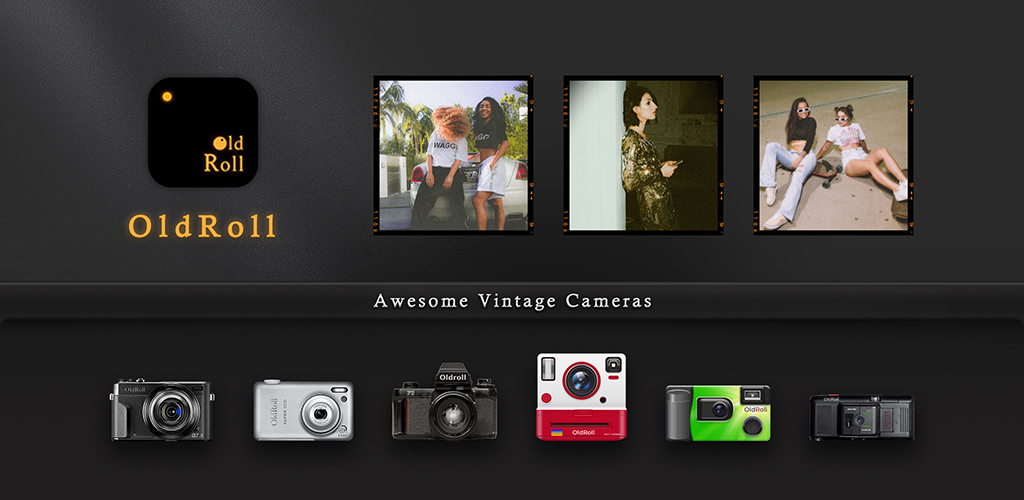
OldRoll is the closest match for what Kapi Cam does, only bigger. It ships over 60 vintage cameras across CCD digicams, disposables, Polaroid-style instants and 8mm video, each with its own colour science, grain profile and shutter behaviour. Real-time preview shows the effect before you shoot, and the newer video mode records with the same look. Kapi Cam vs OldRoll comes down to depth: Kapi has the cleaner interface, OldRoll has the deeper camera bag.
Where it falls short: The interface can feel cluttered when the full camera list is unlocked, and OldRoll pushes membership prompts more aggressively than Kapi does. A handful of cameras are gated behind season passes, not the base subscription.
Pricing:
- Free: Around 10 cameras, ad-supported, basic filters
- Paid: OldRoll Premium at about $3.99 a month or $19.99 a year
- vs Kapi Cam: Comparable subscription cost, but the camera catalogue is roughly 3x larger
Migrating from Kapi Cam: No importer. Existing shots stay in your gallery either way. To recreate a Kapi look in OldRoll, pick the CCD or 8mm cam that matches your Kapi favourite and shoot fresh.
Download: Aptoide · Google Play · App Store
Bottom line: Pick OldRoll when you want more cameras to play with and are happy trading Kapi’s cleaner UI for a much bigger catalogue.
VSCO, best for free film-look editing at scale
VSCO is a shooter and an editor. It ships 10 free film-inspired presets and unlocks over 200 more on the paid tier, including Fuji, Kodak, Agfa and Ilford emulations that hold up on real film comparisons. It also has a proper editor with curves, HSL and grain that Kapi Cam does not offer. Kapi Cam vs VSCO is capture-first versus edit-first: Kapi feels like using a retro camera, VSCO feels like developing the film afterwards.
Where it falls short: The in-app camera is basic compared to Kapi and OldRoll. No live viewfinder filter selection, no dedicated CCD or DV modes. Some presets read as flat next to a purpose-built analog sim.
Pricing:
- Free: 10 presets, basic editor, camera, unlimited edits
- Paid: VSCO Membership at $29.99 a year, VSCO Pro at $59.99 a year with video presets
- vs Kapi Cam: Free tier is stronger, paid tier costs less per year than most Kapi + AI Pro combinations
Migrating from Kapi Cam: Import any Kapi shot into VSCO and layer a Kodak Portra or Fuji Superia preset on top. VSCO keeps the original in its Studio so you can undo any edit without losing the shot.
Download: Google Play · App Store
Bottom line: Pick VSCO when you already have shots you want to age up and you want a real editor, not just a retro shutter.
NOMO CAM, best for minimalist point-and-shoot analog
NOMO CAM treats each camera as a physical object. You cannot preview a filter, tap through presets, or edit after the shot. Pick a camera, look through the viewfinder, press the shutter, and wait for the app to develop the image. That constraint is exactly the appeal for shooters who miss the discipline of a real film cam. Kapi Cam vs NOMO is instant gratification versus the wait: NOMO makes you commit.
Where it falls short: No editing at all is a design choice, not a bug, but it is a hard sell for anyone who wants to fix a bad exposure. The per-camera pricing model means the collection cost adds up fast if you want more than a couple of looks.
Pricing:
- Free: Three fixed film cams
- Paid: $2.99 per camera pack, or NOMO PRO at about $19.99 a year for unlimited cams
- vs Kapi Cam: PRO subscription is comparable, but individual cam packs are cheaper if you only want one or two looks
Migrating from Kapi Cam: Not applicable. NOMO is a capture app only. Keep Kapi’s old shots in your gallery and use NOMO for new sessions.
Download: Aptoide · Google Play · App Store
Bottom line: Pick NOMO when you want the film camera experience without the filter menus, and you value shooting discipline over editing power.
ProCCD, best for dedicated CCD digicam simulation
ProCCD does one thing. It simulates the colour science and image processing of early 2000s CCD compact cameras, right down to the low-light noise, the slightly warm skin tones and the classic date stamp in the corner. If Kapi’s CCD cam is your favourite mode and you wish it went deeper, this is the specialist. Kapi Cam vs ProCCD is generalist versus specialist: Kapi covers CCD alongside DV and analog, ProCCD is CCD end to end.
Where it falls short: The trial version watermarks every export, which is aggressive. There are no other camera styles, so if you want DV or Polaroid looks you still need another app.
Pricing:
- Free: Trial with watermark on every shot
- Paid: ProCCD Pro at about $3.99 a month or $19.99 a year
- vs Kapi Cam: Similar cost per month, but scope is narrower
Migrating from Kapi Cam: No import. Kapi’s CCD shots already look like they came from ProCCD, so you can keep them as-is and use ProCCD for new sessions when you want deeper CCD tuning.
Download: Aptoide · Google Play · App Store
Bottom line: Pick ProCCD when the CCD look is the reason you use Kapi at all and you want the sharpest version of it.
Huji Cam, best for the iconic 90s disposable look
Huji Cam was one of the first apps to make Y2K photography a trend on Instagram, and it still owns the disposable-camera aesthetic. Every shot gets a red date stamp, a light leak, and the grain of a $10 supermarket film. It even limits how quickly you can review shots to mimic the wait for prints. Kapi Cam vs Huji Cam is broad Y2K toolbox versus one perfect 1998 preset.
Where it falls short: One look, take it or leave it. The paid version unlocks colour options and a few extra light-leak variants, but no one buys Huji for range.
Pricing:
- Free: Full Huji cam experience, ad-supported
- Paid: $1.99 one-time for the Pro upgrade removing ads and unlocking effect variants
- vs Kapi Cam: Cheapest option in the group by a wide margin
Migrating from Kapi Cam: Not applicable. Huji is capture-only and imports are not the point.
Download: Aptoide · Google Play · App Store
Bottom line: Pick Huji Cam when you want the archetypal Y2K disposable look for less than the price of a coffee.
Tezza, best for creator-first aesthetic editing
Tezza is built for the Instagram and TikTok creator crowd, with curated preset packs from photographers and filmmakers, retro film frames like Super 8 and VHS, and effects that work on both photo and video in the same app. It leans indie and moody rather than the DV or CCD end of the spectrum. Kapi Cam vs Tezza is retro camera hardware feel versus creator preset ecosystem.
Where it falls short: The free tier is thin, and most of the presets that people actually want sit behind the subscription. The interface leans style over speed, which can slow down bulk editing.
Pricing:
- Free: Limited preset selection, basic edit
- Paid: Tezza Membership at $5.99 a month or $39.99 a year
- vs Kapi Cam: More expensive monthly, but covers photo, video and preset drops in one subscription
Migrating from Kapi Cam: Import any Kapi shot as a source photo, then run a preset over it. Tezza handles video too, so a Kapi DV clip can be pushed further with a VHS overlay.
Download: Google Play · App Store
Bottom line: Pick Tezza when you edit for social first and want curated packs rather than a single retro look.
Vintage Film Camera, best for the richest single-app vintage cam library
Vintage Film Camera ships 14 named cam models across CCD, disposable, Polaroid-style, DV and mirrorless-inspired presets, each with its own story on the preview page. Standouts include the K Funs disposable clone, the Pola N Polaroid Now clone and the Inst M Instax Mini clone. It also captures video and has an import mode for applying its filters to existing shots. Kapi Cam vs Vintage Film Camera is quick DV and CCD shooter versus a full retro camera cabinet.
Where it falls short: The pricing model is subscription-first, and a few of the newer cams roll in as members-only. The onboarding takes a minute because the camera picker is dense.
Pricing:
- Free: Around six cameras and most core effects
- Paid: Membership at about $4.99 a month or $29.99 a year
- vs Kapi Cam: Similar annual cost, roughly double the number of named cameras
Migrating from Kapi Cam: Use the import feature to run a vintage cam profile over any Kapi shot. Old Kapi negatives keep their look, and new Vintage Film Camera shots slot into the same gallery folder.
Download: Aptoide · Google Play
Bottom line: Pick Vintage Film Camera when you want the widest cabinet of named retro cams in one app and are ready to pay for the depth.
How to choose
Pick OldRoll or Vintage Film Camera if the reason you loaded Kapi Cam was the DV and CCD look and you want more cameras to rotate through. Both cover the same aesthetic ground with a much bigger catalogue and a comparable subscription cost.
Pick VSCO if you have a camera roll full of shots already and you want to age them up. It is the only pick here with a serious editor, real cloud libraries and film emulations that work on any source image.
Pick NOMO CAM if you want the discipline of shooting without a preview. It is not the widest catalogue, but the no-edit workflow scratches the film-photography itch in a way Kapi does not.
Pick ProCCD if CCD is the only camera in Kapi you actually use. The specialist tuning is worth the narrower scope.
Pick Huji Cam if you want one perfect Y2K look for pocket money.
Pick Tezza if you edit for TikTok or Instagram first and want curated preset packs across photo and video.
Stay on Kapi Cam if you value the clean, ad-free interface, you shoot mostly DV and CCD, and the free camera set covers what you need day to day. It is a well-made app, just not the deepest one.
FAQ
What is the best free alternative to Kapi Cam?
VSCO has the strongest free tier, with 10 film-inspired presets, a working editor and no watermarks. Huji Cam is a close second if you only want the disposable-camera look and can tolerate ads.
Is OldRoll better than Kapi Cam?
OldRoll has more cameras, more granular control and a longer track record of updates. Kapi Cam has the cleaner interface and no ads on the free tier. For catalogue depth, OldRoll wins. For a quick, focused DV or CCD shooter, Kapi still holds up.
Can I import photos from Kapi Cam into another app?
Any Kapi Cam shot saves to your device gallery, so any editor can pick it up. VSCO, Tezza and Vintage Film Camera all take imports and can layer their filters on top. NOMO CAM, Huji Cam and ProCCD are capture-only and do not import.
Is there a Y2K CCD camera app without a subscription?
Huji Cam is the closest thing, with a one-time $1.99 upgrade for its full feature set. Most other CCD and Y2K apps run on monthly or yearly subscriptions.
What do people use instead of Kapi Cam on iPhone?
The same shortlist mostly applies. OldRoll, VSCO, NOMO CAM, ProCCD, Huji Cam and Tezza all ship an iOS build. Vintage Film Camera is Android-focused at time of writing.
Which Kapi Cam alternative has the best CCD look?
ProCCD is the specialist and worth the subscription if CCD is your main mode. OldRoll and Vintage Film Camera both ship credible CCD emulations alongside their other cameras and are the better value if you want more than one style.